Think about a time you used a design tool like Canva. As you played around with gradients—adding, tweaking, and removing colors—the interface felt effortless. This seamless interaction relies on robust state management principles.
In this article, we'll explore dynamic state management in React by creating a gradient generator tool. Step by step, you'll understand how to:
- Manage dynamic arrays using
useState - Implement constraints for user actions
- Build a responsive UI that reflects real-time updates
By the end, you'll be able to extend these concepts to other projects, like shopping carts, dashboards, or interactive design tools.
The Gradient Generator Tool
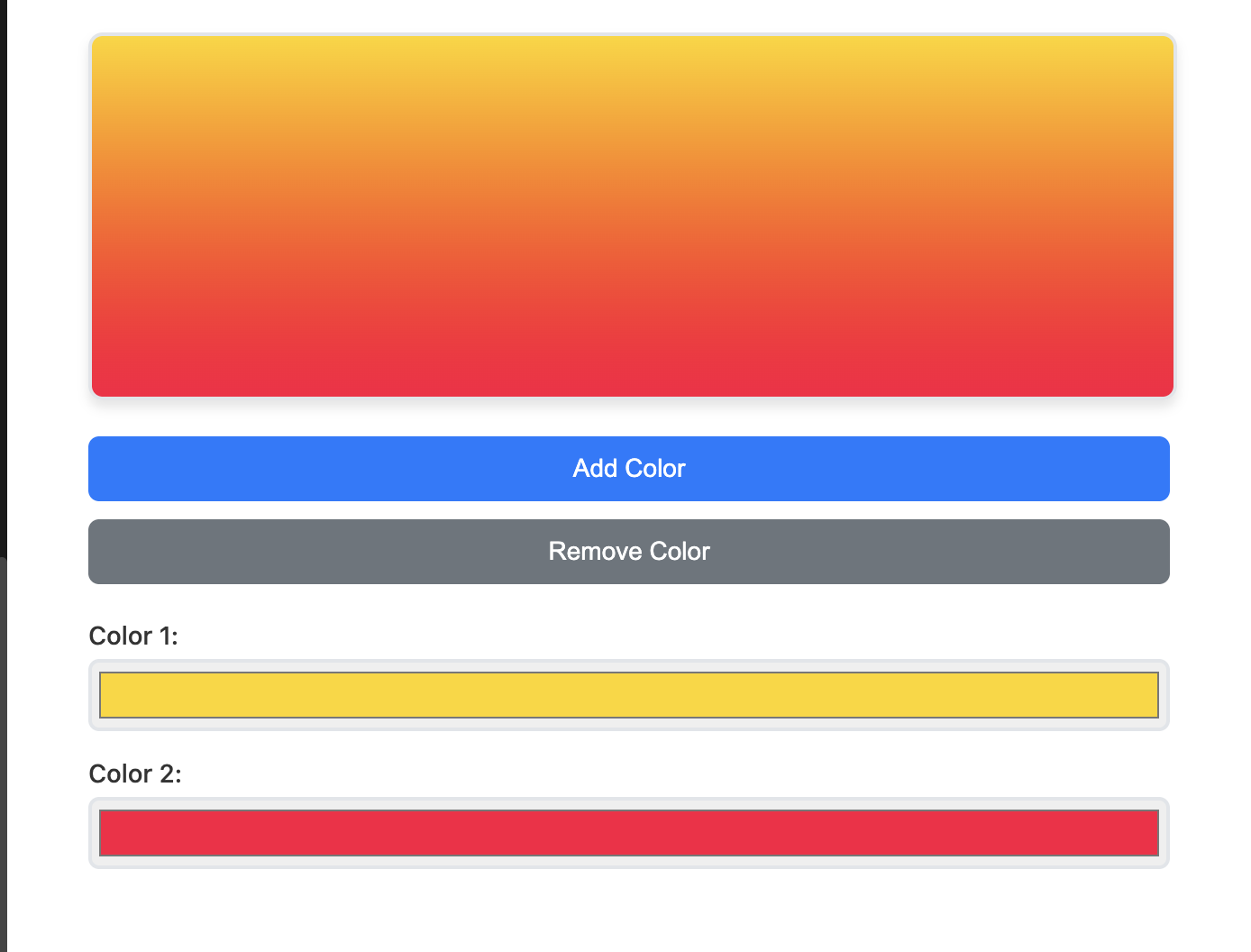
#Here's a preview of what we're building:
- A gradient preview box that dynamically updates as you:
- Add or remove colors (up to five and no less than two)
- Undo removals or tweak color values in real time
- Interactive color pickers control each gradient stop
Step 1: Setting Up State
#We start by setting up two pieces of state:
colors– an array of gradient colorsremovedColors– a stack of removed colors for undo functionality
const [colors, setColors] = React.useState(['#FFD500', '#FF0040']);
const [removedColors, setRemovedColors] = React.useState([]);
Explanation
#- Purpose: The
colorsarray tracks active gradient stops, and the UI automatically updates whenever it changes - Immutability: React's
useStateenforces best practices by ensuring state updates are predictable and prevent direct mutation
Step 2: Displaying the Gradient
#With colors in place, we can generate a dynamic gradient background and render it in the UI.
const colorStops = colors.join(', ');
const backgroundImage = `linear-gradient(${colorStops})`;

return (
  <div
    className="gradient-preview"
    style={{ backgroundImage }}
  />
);
Explanation
#-
Gradient Construction:
- The
colors.join(', ')method combines all colors into a CSS-friendly format backgroundImagedynamically reflects the currentcolorsarray
- The
-
Live Preview:
- The
<div>renders the gradient as its background, updating automatically whencolorschanges
- The
Step 3: Adding Colors
#Users can add a new color to the gradient, up to five. If a previously removed color exists, it's restored before adding a default value.
const addColor = () => {
  if (colors.length < 5) { // Enforce maximum of 5 colors
    if (removedColors.length > 0) { // Restore removed color
      const lastRemovedColor = removedColors.pop();
      setColors([...colors, lastRemovedColor]);
      setRemovedColors([...removedColors]);
    } else { // Add default red
      setColors([...colors, '#FF0000']);
    }
  } else {
    alert('You can only add 5 colors.');
  }
};
Explanation
#-
Constraint Handling:
- The
ifcondition ensures users can't exceed the maximum of five colors
- The
-
Undo Restoration:
- If the
removedColorsarray contains values, the most recent one (pop()) is restored to the gradient
- If the
-
Default Addition:
- When no removed colors exist, a default red (
#FF0000) is added to maintain usability
- When no removed colors exist, a default red (
Step 4: Removing Colors
#Users can remove a color, but the gradient must always retain at least two stops. Removed colors are stored for potential undo actions.
const removeColor = () => {
  if (colors.length > 2) { // Ensure minimum of 2 colors
    const lastColor = colors.pop();
    setColors([...colors]);
    setRemovedColors([...removedColors, lastColor]);
  } else {
    alert('You need at least 2 colors.');
  }
};
Explanation
#-
Constraint Enforcement:
- The
ifstatement ensures users can't reduce the gradient to fewer than two colors
- The
-
Undo Support:
- Removed colors are stored in the
removedColorsarray for restoration
- Removed colors are stored in the
-
State Update:
- Both
colorsandremovedColorsare updated immutably to trigger a UI re-render
- Both
Step 5: Updating Colors
#Users can modify gradient stops in real time using a color picker input.
{colors.map((color, index) => (
  <input
    key={index}
    type="color"
    value={color}
    onChange={(event) => {
      const updatedColor = event.target.value;
      const newColors = [...colors];
      newColors[index] = updatedColor;
      setColors(newColors);
    }}
  />
))}
Explanation
#-
Dynamic Inputs:
- Each color is rendered as a color picker input, allowing users to tweak it
-
Real-Time Updates:
- Changes made via
onChangeare immediately reflected in the gradient preview
- Changes made via
-
Immutability:
- A new array (
newColors) is created and updated to ensure React's state principles are respected
- A new array (
Complete Working Component
#Here's the full gradient generator component with all functionality integrated:
Try It Live
#Interactive Demo: Copy the code below and run it in your React project or CodeSandbox.io to see the gradient generator in action!
Features to try:
- Add colors (up to 5)
- Remove colors (minimum 2)
- Adjust gradient angle with the slider
- Change individual colors with the color pickers
- See real-time updates as you interact
Source Code
#import React, { useState } from 'react';
function GradientGenerator() {
const [colors, setColors] = useState(['#FFD500', '#FF0040']);
const [removedColors, setRemovedColors] = useState([]);
const addColor = () => {
if (colors.length < 5) {
if (removedColors.length > 0) {
const lastRemovedColor = removedColors.pop();
setColors([...colors, lastRemovedColor]);
setRemovedColors([...removedColors]);
} else {
setColors([...colors, '#FF0000']);
}
} else {
alert('You can only add 5 colors.');
}
};
const removeColor = () => {
if (colors.length > 2) {
const lastColor = colors.pop();
setColors([...colors]);
setRemovedColors([...removedColors, lastColor]);
} else {
alert('You need at least 2 colors.');
}
};
const updateColor = (index, newColor) => {
const newColors = [...colors];
newColors[index] = newColor;
setColors(newColors);
};
const colorStops = colors.join(', ');
const backgroundImage = `linear-gradient(${colorStops})`;
return (
<div className="gradient-generator">
<div
className="gradient-preview"
style={{
backgroundImage,
width: '100%',
height: '200px',
borderRadius: '8px',
marginBottom: '20px'
}}
/>
<div className="controls">
<button onClick={addColor} disabled={colors.length >= 5}>
Add Color
</button>
<button onClick={removeColor} disabled={colors.length <= 2}>
Remove Color
</button>
</div>
<div className="color-pickers">
{colors.map((color, index) => (
<div key={index} className="color-picker">
<label>Color {index + 1}:</label>
<input
type="color"
value={color}
onChange={(event) => updateColor(index, event.target.value)}
/>
</div>
))}
</div>
</div>
);
}
export default GradientGenerator;
CSS Styles
#Add these styles to make the gradient generator look polished:
.gradient-generator {
  max-width: 600px;
  margin: 0 auto;
  padding: 20px;
  font-family: -apple-system, BlinkMacSystemFont, 'Segoe UI', 'Roboto', sans-serif;
}

.gradient-preview {
  border: 2px solid #e1e5e9;
  box-shadow: 0 4px 6px rgba(0, 0, 0, 0.1);
  transition: all 0.3s ease;
}

.controls {
  display: flex;
  gap: 10px;
  margin-bottom: 20px;
}

.controls button {
  padding: 10px 20px;
  border: none;
  border-radius: 6px;
  background: #007bff;
  color: white;
  cursor: pointer;
  font-size: 14px;
  transition: background 0.2s ease;
}

.controls button:hover:not(:disabled) {
  background: #0056b3;
}

.controls button:disabled {
  background: #6c757d;
  cursor: not-allowed;
}

.color-pickers {
  display: grid;
  grid-template-columns: repeat(auto-fit, minmax(200px, 1fr));
  gap: 15px;
}

.color-picker {
  display: flex;
  flex-direction: column;
  gap: 5px;
}

.color-picker label {
  font-weight: 500;
  color: #333;
  font-size: 14px;
}

.color-picker input[type="color"] {
  width: 100%;
  height: 40px;
  border: 2px solid #e1e5e9;
  border-radius: 6px;
  cursor: pointer;
  transition: border-color 0.2s ease;
}

.color-picker input[type="color"]:hover {
  border-color: #007bff;
}

/* Responsive design */
@media (max-width: 768px) {
  .gradient-generator {
    padding: 10px;
  }

  .controls {
    flex-direction: column;
  }

  .color-pickers {
    grid-template-columns: 1fr;
  }
}
Advanced Features
#Gradient Direction Control
#Add a slider to control the gradient angle:
const [angle, setAngle] = useState(90);

const backgroundImage = `linear-gradient(${angle}deg, ${colorStops})`;

return (
  <div>
    <label>Gradient Angle: {angle}°</label>
    <input
      type="range"
      min="0"
      max="360"
      value={angle}
      onChange={(e) => setAngle(parseInt(e.target.value))}
    />
    {/* ... rest of component */}
  </div>
);
Save and Load Presets
#Enable users to save and load gradient configurations:
const [presets, setPresets] = useState([]);

const savePreset = () => {
  const presetName = prompt('Enter preset name:');
  if (presetName) {
    setPresets([...presets, { name: presetName, colors, angle }]);
  }
};

const loadPreset = (preset) => {
  setColors(preset.colors);
  setAngle(preset.angle);
  setRemovedColors([]);
};
CSS Export
#Generate CSS code for the gradient:
const generateCSS = () => {
  return `background: linear-gradient(${angle}deg, ${colorStops});`;
};

const copyToClipboard = () => {
  navigator.clipboard.writeText(generateCSS());
  alert('CSS copied to clipboard!');
};
Applications Beyond Gradients
#E-Commerce Shopping Cart
#const [cartItems, setCartItems] = useState([]);
const addToCart = (product) => {
setCartItems([...cartItems, { ...product, id: Date.now() }]);
};
const removeFromCart = (itemId) => {
setCartItems(cartItems.filter(item => item.id !== itemId));
};
const updateQuantity = (itemId, quantity) => {
setCartItems(cartItems.map(item =>
item.id === itemId ? { ...item, quantity } : item
));
};
Analytics Dashboard Filters
#const [filters, setFilters] = useState([]);
const addFilter = (filter) => {
if (!filters.some(f => f.type === filter.type)) {
setFilters([...filters, filter]);
}
};
const removeFilter = (filterType) => {
setFilters(filters.filter(f => f.type !== filterType));
};
const updateFilter = (filterType, newValue) => {
setFilters(filters.map(f =>
f.type === filterType ? { ...f, value: newValue } : f
));
};
Performance Optimization
#Memoization for Expensive Calculations
#import { useMemo } from 'react';
const gradientCSS = useMemo(() => {
return `linear-gradient(${angle}deg, ${colors.join(', ')})`;
}, [colors, angle]);
const colorStops = useMemo(() => {
return colors.join(', ');
}, [colors]);
Debounced Updates
#import { useCallback } from 'react';
import { debounce } from 'lodash';
const debouncedUpdateColor = useCallback(
debounce((index, color) => {
updateColor(index, color);
}, 300),
[]
);
Common Pitfalls and Solutions
#Pitfall 1: Direct State Mutation
#// ❌ WRONG: Direct mutation
const updateColor = (index, newColor) => {
colors[index] = newColor; // This won't trigger re-render
setColors(colors);
};
// ✅ CORRECT: Immutable update
const updateColor = (index, newColor) => {
const newColors = [...colors];
newColors[index] = newColor;
setColors(newColors);
};
Pitfall 2: Missing Key Props
#// ❌ WRONG: Using index as key
{colors.map((color, index) => (
<ColorPicker key={index} color={color} />
))}
// ✅ CORRECT: Stable unique keys
{colors.map((color, index) => (
<ColorPicker key={`color-${index}-${color}`} color={color} />
))}
Pitfall 3: Inefficient Re-renders
#// ❌ WRONG: Creating objects in render
return (
<div style={{ backgroundImage: `linear-gradient(${colors.join(', ')})` }}>
{colors.map(color => <ColorPicker color={color} />)}
</div>
);
// ✅ CORRECT: Memoized calculations
const backgroundImage = useMemo(() =>
`linear-gradient(${colors.join(', ')})`,
[colors]
);
return (
<div style={{ backgroundImage }}>
{colors.map(color => <ColorPicker color={color} />)}
</div>
);
Testing Your Component
#Unit Tests with React Testing Library
#import { render, screen, fireEvent } from '@testing-library/react';
import GradientGenerator from './GradientGenerator';
test('adds color when add button is clicked', () => {
render(<GradientGenerator />);
const addButton = screen.getByText('Add Color');
fireEvent.click(addButton);
expect(screen.getAllByRole('textbox')).toHaveLength(3);
});
test('removes color when remove button is clicked', () => {
render(<GradientGenerator />);
const removeButton = screen.getByText('Remove Color');
fireEvent.click(removeButton);
expect(screen.getAllByRole('textbox')).toHaveLength(1);
});
Conclusion
#By combining React's useState with thoughtful constraints and immutability, you've built a responsive gradient generator. These principles are not just for gradients—they're essential for any interactive UI.
The key takeaways:
- Immutable Updates: Always create new arrays/objects when updating state
- Constraint Handling: Implement business rules to guide user interactions
- Real-time Updates: Use state to drive UI changes automatically
- Performance: Memoize expensive calculations and debounce user inputs
Try This Next
#- Adjust Gradient Angles: Add a slider to control the gradient angle
- Save Configurations: Enable users to save and load gradient presets
- Extend the Palette: Incorporate pre-defined color schemes for quick customization
- Add Animations: Smooth transitions between gradient changes
- Export Options: Generate CSS, SVG, or image files
These patterns will serve you well in building any dynamic, interactive React application.