
You've built something you're proud of. A blog, a portfolio, a side project that actually works. You deploy it to Vercel, grab the link, and share it on Twitter.
And then you see it.
Instead of the beautiful preview card you imagined—your carefully chosen cover image, your compelling title—you get... your site's generic logo. Or worse, nothing at all. A blank card with just a URL staring back at you.

You've already tried adding react-helmet. You've got og:image tags in your component. You can see them in your browser's dev tools. So why doesn't it work?
Here's the uncomfortable truth: your meta tags are invisible to social media platforms.
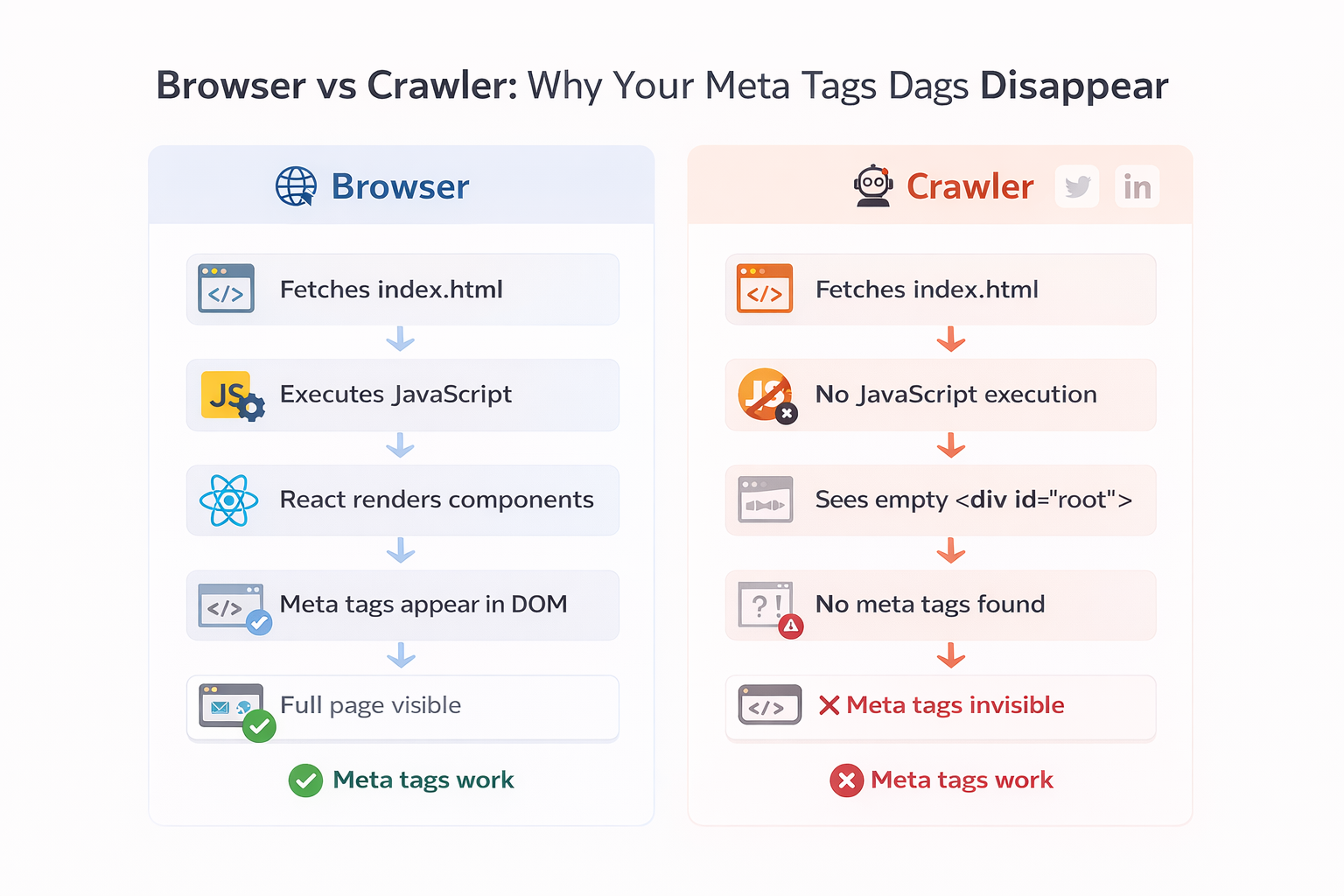
The core issue in one image: Your browser executes JavaScript and sees your fully rendered app. Crawlers don't. They see an empty div.
Let me explain why, and more importantly, how to fix it without rewriting your entire app.
The Core Problem: Crawlers Don't Run JavaScript
#To understand why your meta tags aren't working, you need to understand how social media platforms "see" your page.
When you visit your React app in a browser, here's what happens:
- Browser fetches index.html (mostly empty, with a
<div id="root"></div>) - Browser downloads and executes your JavaScript bundle
- React renders your components, including those meta tags
- You see your beautiful page
But when Twitter, LinkedIn, or WhatsApp fetch your URL to generate a preview, they do something different:
- Crawler fetches index.html
- Crawler reads the HTML
- That's it. No JavaScript execution.
The crawler sees your empty <div id="root"></div> and whatever static meta tags exist in your original index.html. Your React-rendered og:image? It never exists as far as the crawler is concerned.
This is the "empty div" problem. Your app is a beautiful house, but crawlers only see the scaffolding.
💡 "But I'm using react-helmet..."
Here's the thing:
react-helmet,react-helmet-async, and similar libraries all work the same way; they modify the DOM after React hydrates. The meta tags only appear once JavaScript runs.Crawlers don't wait. They don't execute your bundle. They read the initial HTML response and move on. By the time Helmet would have injected your tags, the crawler is already gone.
Bottom line: Client-side meta tag injection is invisible to every major social platform.
Meet the Open Graph Protocol
#Before we fix anything, let's understand what crawlers are actually looking for.
The Open Graph Protocol is a set of meta tags that tell platforms how to display your content. The essential ones:
<meta property="og:title" content="Your Page Title" />
<meta property="og:description" content="A compelling description" />
<meta property="og:image" content="https://yoursite.com/image.png" />
<meta property="og:url" content="https://yoursite.com/page" />
<meta property="og:type" content="article" />
For Twitter (now X), you also want:
<meta name="twitter:card" content="summary_large_image" />
<meta name="twitter:title" content="Your Page Title" />
<meta name="twitter:description" content="A compelling description" />
<meta name="twitter:image" content="https://yoursite.com/image.png" />
The critical insight: these tags must be present in the initial HTML response. Not injected by JavaScript. Not added after hydration.
Three Paths Forward
#You have three options. Each involves trade-offs.
Option 1: Switch to SSR/SSG (The "Start Over" Approach)
#Frameworks like Next.js, Remix, and Astro render your pages on the server. Meta tags are baked into the HTML before it reaches anyone, crawler or human.
Pros: Solves the problem completely. Better SEO overall.
Cons: Requires migrating your entire app. If you've got a working Vite + React setup, this is a significant lift.
Option 2: Pre-rendering Services (The "Pay Someone" Approach)
#Services like Prerender.io detect crawlers and serve them a pre-rendered version of your page.
Pros: No code changes to your app.
Cons: Another service to pay for and maintain. Adds latency. Can be overkill for a blog.
Option 3: Edge Function Interception (The "Surgical Fix")
#Intercept crawler requests at the edge, serve them a lightweight HTML page with the right meta tags, and let everyone else get your normal SPA.
Pros: Minimal changes to your existing app. Free on Vercel's hobby tier. Fast.
Cons: Requires some setup. You're maintaining a parallel system for crawlers.
We're going with Option 3. It's the right balance of effort and payoff for most SPA projects.
🤔 Why Edge Functions Beat Pre-rendering Services
Pre-rendering services like Prerender.io work, but they introduce problems:
Factor Pre-rendering Service Edge Function Latency Adds 100-500ms (external service call) Near-zero (runs at edge) Cost $90-290+/month for decent volume Free on Vercel/Cloudflare hobby tier Complexity Another vendor, another dashboard, another thing to debug Your code, your control Cache staleness Their cache, their rules You control TTL Full page render Renders entire page (overkill for meta tags) Serves minimal HTML with just what crawlers need Edge functions give you surgical precision: serve crawlers exactly what they need, nothing more. No external dependencies, no monthly bills, no cache mysteries.
The Fix: Intercept Crawlers at the Edge
#Here's the game plan:
- At build time: Generate a JSON file containing metadata for all your pages
- At request time: Detect if the request is from a crawler
- If crawler: Serve a minimal HTML page with the correct meta tags
- If human: Serve your normal SPA
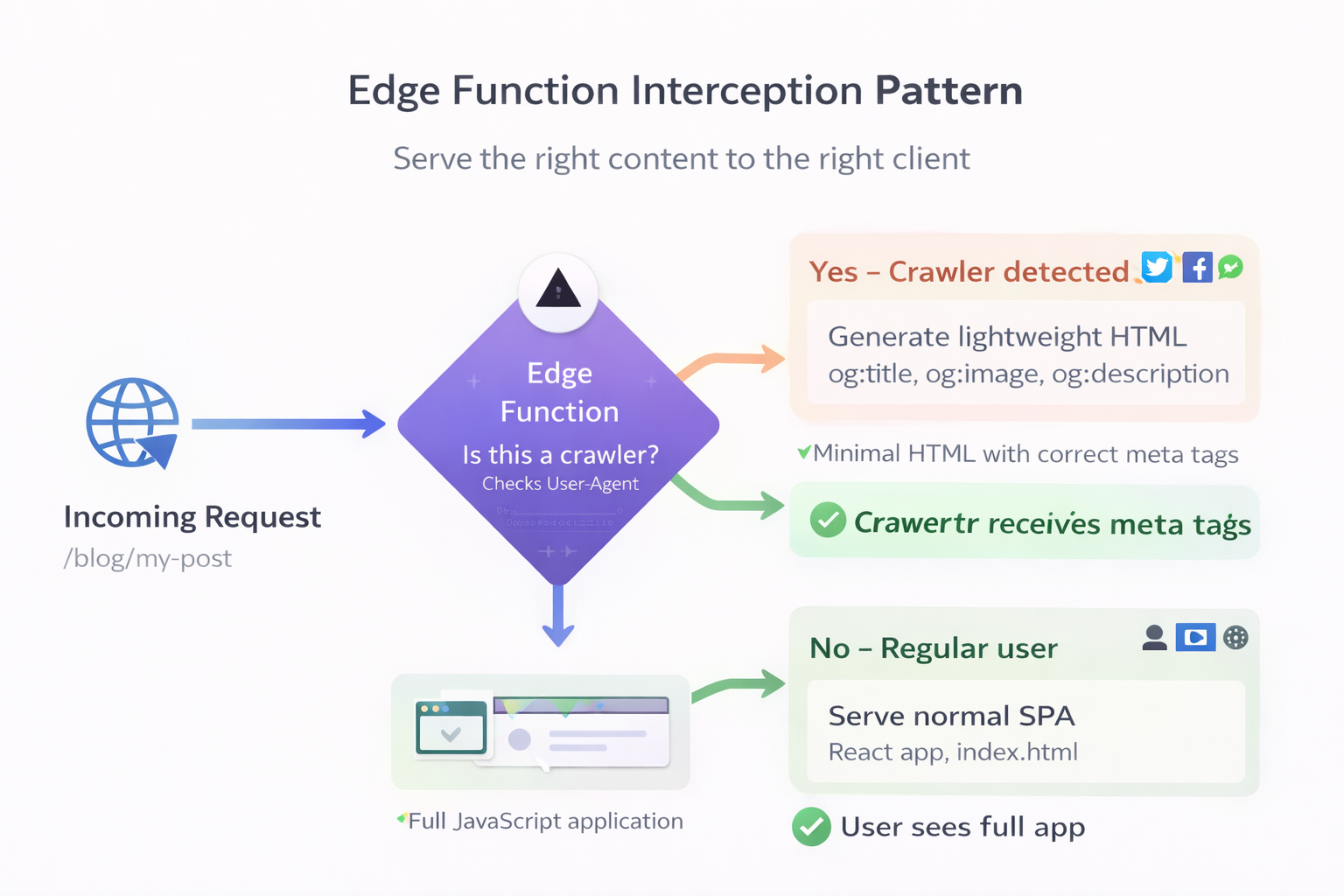
Let's build it.
Step 1: Generate Metadata at Build Time
#Create a script that reads your content files and extracts their frontmatter into a JSON file. This runs during your build process.
Note: Replace
yoursite.comwith your actual domain throughout this tutorial.
// scripts/generate-posts-meta.js
import fs from 'fs';
import path from 'path';
import { fileURLToPath } from 'url';

const __filename = fileURLToPath(import.meta.url);
const __dirname = path.dirname(__filename);

const ARTICLES_DIR = path.join(__dirname, '../src/content/articles');
const OUTPUT_FILE = path.join(__dirname, '../public/posts-meta.json');

function extractFrontmatter(content) {
  const match = content.match(/^---\s*\n([\s\S]*?)\n---/);
  if (!match) return null;

  const frontmatter = {};
  const lines = match[1].split('\n');

  for (const line of lines) {
    const colonIndex = line.indexOf(':');
    if (colonIndex === -1) continue;

    const key = line.slice(0, colonIndex).trim();
    let value = line.slice(colonIndex + 1).trim();

    // Remove quotes
    if ((value.startsWith('"') && value.endsWith('"')) ||
        (value.startsWith("'") && value.endsWith("'"))) {
      value = value.slice(1, -1);
    }

    // Parse arrays
    if (value.startsWith('[') && value.endsWith(']')) {
      try {
        value = JSON.parse(value.replace(/'/g, '"'));
      } catch {
        // Keep as string if parsing fails
      }
    }

    frontmatter[key] = value;
  }

  return frontmatter;
}

function generatePostsMeta() {
  const files = fs.readdirSync(ARTICLES_DIR).filter(f => f.endsWith('.mdx'));
  const posts = {};

  for (const file of files) {
    const content = fs.readFileSync(path.join(ARTICLES_DIR, file), 'utf-8');
    const frontmatter = extractFrontmatter(content);

    if (!frontmatter) continue;
    if (frontmatter.draft === true) continue;

    // IMPORTANT: Always use filename as slug, never frontmatter
    const slug = file.replace('.mdx', '');

    posts[slug] = {
      title: frontmatter.title || 'Untitled',
      excerpt: frontmatter.excerpt || '',
      coverImage: frontmatter.coverImage || null,
      date: frontmatter.date || '',
      author: frontmatter.author || 'Unknown',
      tags: Array.isArray(frontmatter.tags) ? frontmatter.tags : []
    };
  }

  fs.writeFileSync(OUTPUT_FILE, JSON.stringify(posts, null, 2));
  console.log(`Generated metadata for ${Object.keys(posts).length} posts`);
}

generatePostsMeta();
Add this to your build process in package.json:
{
  "scripts": {
    "prebuild": "node scripts/generate-posts-meta.js",
    "build": "vite build"
  }
}
Step 2: Create the Edge Function
#This function detects crawlers and serves them appropriate meta tags.
// api/og.ts
import type { VercelRequest, VercelResponse } from '@vercel/node';
const SITE_URL = 'https://yoursite.com'; // Replace with your domain
const DEFAULT_IMAGE = `${SITE_URL}/default-og.png`;
const DEFAULT_TITLE = 'Your Site Name'; // Replace with your site name
const DEFAULT_DESCRIPTION = 'Your site description'; // Replace with your description
interface PostMeta {
title: string;
excerpt: string;
coverImage: string | null;
date: string;
author: string;
tags: string[];
}
const CRAWLER_USER_AGENTS = [
'facebookexternalhit',
'Facebot',
'Twitterbot',
'LinkedInBot',
'WhatsApp',
'Slackbot',
'TelegramBot',
'Pinterest',
'Discordbot',
];
function isCrawler(userAgent: string | undefined): boolean {
if (!userAgent) return false;
return CRAWLER_USER_AGENTS.some(bot =>
userAgent.toLowerCase().includes(bot.toLowerCase())
);
}
function escapeHtml(str: string): string {
return str
.replace(/&/g, '&')
.replace(/</g, '<')
.replace(/>/g, '>')
.replace(/"/g, '"')
.replace(/'/g, ''');
}
function generateHTML(meta: {
title: string;
description: string;
image: string;
url: string;
}): string {
const { title, description, image, url } = meta;
return `<!DOCTYPE html>
<html lang="en">
<head>
<meta charset="UTF-8" />
<title>${escapeHtml(title)}</title>
<meta name="description" content="${escapeHtml(description)}" />
<!-- Open Graph -->
<meta property="og:type" content="article" />
<meta property="og:title" content="${escapeHtml(title)}" />
<meta property="og:description" content="${escapeHtml(description)}" />
<meta property="og:image" content="${escapeHtml(image)}" />
<meta property="og:image:width" content="1200" />
<meta property="og:image:height" content="630" />
<meta property="og:url" content="${escapeHtml(url)}" />
<!-- Twitter -->
<meta name="twitter:card" content="summary_large_image" />
<meta name="twitter:title" content="${escapeHtml(title)}" />
<meta name="twitter:description" content="${escapeHtml(description)}" />
<meta name="twitter:image" content="${escapeHtml(image)}" />
<!-- Redirect humans to the real page -->
<meta http-equiv="refresh" content="0;url=${escapeHtml(url)}" />
</head>
<body>
<p>Redirecting to <a href="${escapeHtml(url)}">${escapeHtml(title)}</a>...</p>
</body>
</html>`;
}
export default async function handler(req: VercelRequest, res: VercelResponse) {
const userAgent = req.headers['user-agent'];
const path = req.query.path as string || '';
// If not a crawler, redirect to the actual page
if (!isCrawler(userAgent)) {
return res.redirect(302, `${SITE_URL}/${path}`);
}
// Check if this is a blog post request
const blogMatch = path.match(/^blog\/([^\/]+)$/);
if (blogMatch) {
const slug = blogMatch[1];
try {
const postsResponse = await fetch(`${SITE_URL}/posts-meta.json`);
if (postsResponse.ok) {
const posts = await postsResponse.json();
const post = posts[slug];
if (post) {
const html = generateHTML({
title: `${post.title} | Your Site`,
description: post.excerpt,
image: post.coverImage || DEFAULT_IMAGE,
url: `${SITE_URL}/blog/${slug}`
});
res.setHeader('Content-Type', 'text/html; charset=utf-8');
res.setHeader('Cache-Control', 'public, max-age=3600');
return res.status(200).send(html);
}
}
} catch (error) {
console.error('Error fetching post metadata:', error);
}
}
// Default: return homepage meta tags
const html = generateHTML({
title: DEFAULT_TITLE,
description: DEFAULT_DESCRIPTION,
image: DEFAULT_IMAGE,
url: `${SITE_URL}/${path}`
});
res.setHeader('Content-Type', 'text/html; charset=utf-8');
return res.status(200).send(html);
}
Step 3: Configure Vercel Rewrites
#Tell Vercel to route crawler requests to your edge function. Create or update vercel.json:
{
  "rewrites": [
    {
      "source": "/blog/:slug",
      "has": [
        {
          "type": "header",
          "key": "user-agent",
          "value": ".*(facebookexternalhit|Facebot|Twitterbot|LinkedInBot|WhatsApp|Slackbot|TelegramBot|Pinterest|Discordbot).*"
        }
      ],
      "destination": "/api/og?path=blog/:slug"
    },
    {
      "source": "/(.*)",
      "destination": "/index.html"
    }
  ]
}
The first rewrite catches crawler requests to blog posts and sends them to your edge function. The second is your standard SPA fallback for everything else.
The Silent Failures (This Will Save You Hours)
#Your implementation looks perfect, you deploy it, test on LinkedIn... and it's still showing the wrong image. What gives?
The Slug Mismatch Trap
#This one burned me. If your MDX file is named my-awesome-post.mdx but your frontmatter has slug: "my-awesome-post-2024", you have a problem.
Your URL is /blog/my-awesome-post (from the filename), but your metadata JSON has the key my-awesome-post-2024 (from frontmatter). The lookup fails silently and falls back to your default image.
The fix: Always derive the slug from the filename, never from frontmatter:
// ❌ WRONG - allows mismatches
const slug = frontmatter.slug || file.replace('.mdx', '');

// ✅ RIGHT - filename is the single source of truth
const slug = file.replace('.mdx', '');
Image URL Not Publicly Accessible
#Your og:image URL might be correct, but if the image itself isn't reachable from the public internet, crawlers get nothing.
Common culprits:
- Image is behind authentication
- Image is on localhost or a private network
- Image URL returns a redirect that crawlers don't follow
- Image is dynamically generated and the generation fails for bot requests
The fix: Open your og:image URL in an incognito browser window. If you can't see the image, neither can crawlers.
Cloudflare Hotlink Protection Blocking Bots
#If you're using Cloudflare and have Hotlink Protection enabled, it might be blocking social media crawlers from fetching your images.
What happens: Cloudflare sees a request from facebookexternalhit or Twitterbot and thinks it's hotlinking. It returns a 403 or a placeholder image.
The fix: In Cloudflare dashboard → Scrape Shield → Hotlink Protection, either:
- Disable it entirely, or
- Add exceptions for crawler user agents
- Whitelist your CDN/image domains
How to Verify What Crawlers See
#Don't trust your browser. Use curl with a crawler user-agent:
curl -A "Twitterbot" "https://yoursite.com/blog/your-post" | grep "og:image"
If this returns the correct image URL, your server is working. If not, the problem is in your code.
Pro tip: Also verify the image itself is fetchable:
curl -I -A "Twitterbot" "https://yoursite.com/images/my-og-image.png"
You should see a 200 OK response. A 403, 404, or redirect means trouble.
How to Verify It's Working
#Tools That Still Work
#Facebook Sharing Debugger
developers.facebook.com/tools/debug/
The gold standard. Paste your URL, see exactly what Facebook sees. Use "Scrape Again" to clear their cache.
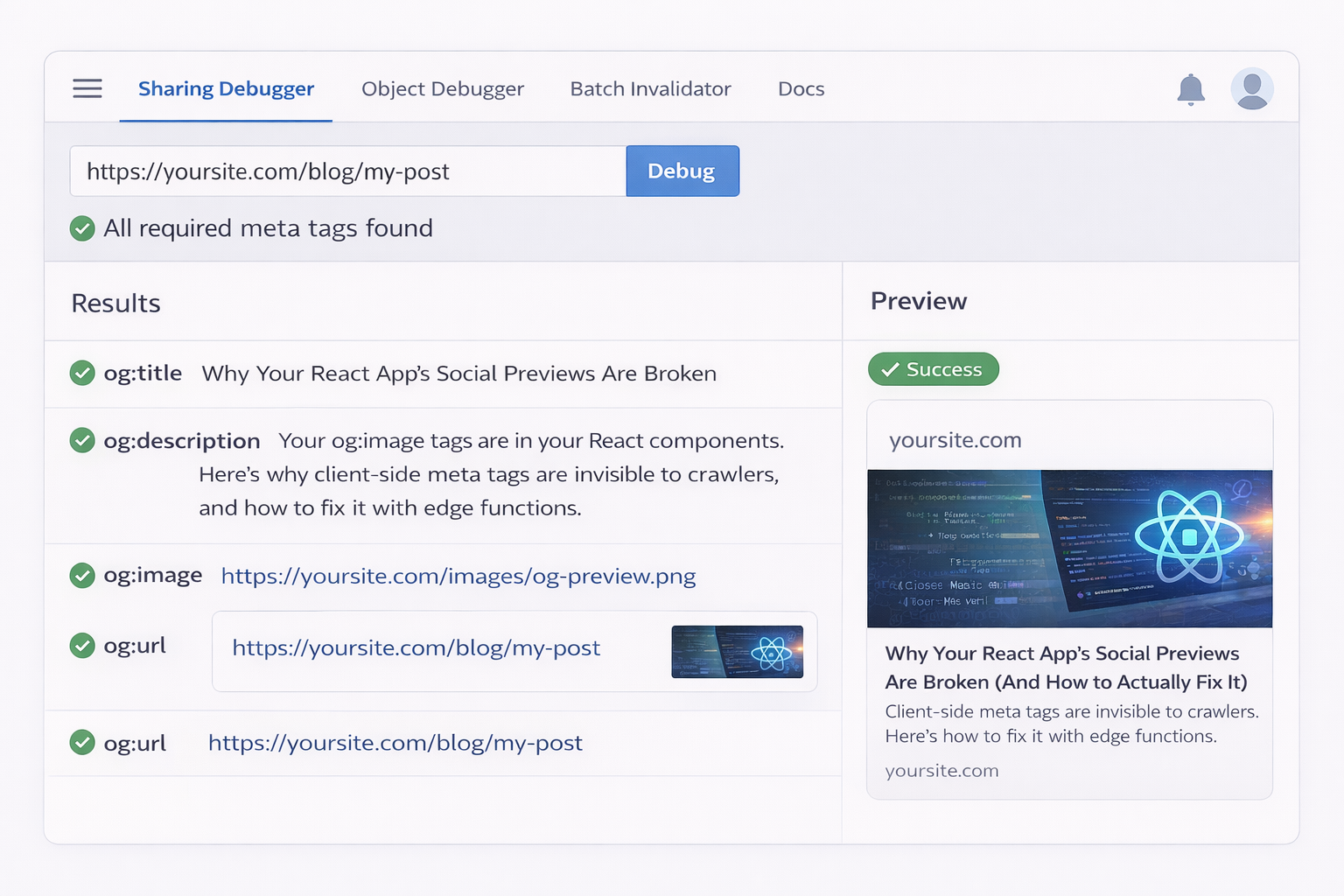
LinkedIn Post Inspector
Similar to Facebook's tool. Paste URL, inspect, done.
Twitter Card Validator (RIP)
Twitter deprecated their card validator in 2022. Your only options now:
- Start composing a tweet and paste the URL to see the preview
- Use a third-party tool
Third-Party Alternatives
- opengraph.xyz — Clean interface, shows previews for multiple platforms
- metatags.io — Similar, with a handy code generator
"I Fixed Everything But It's Still Broken"
#You've deployed. You've verified with curl. The server is returning correct meta tags. But Twitter still shows the old image.
Welcome to cache hell.
Social platforms cache aggressively. LinkedIn caches for about 7 days. Twitter is unpredictable. WhatsApp might hold onto old data for days.
How to Force Cache Refresh
#Facebook: Use their debugger and click "Scrape Again" (sometimes twice)
LinkedIn: The Post Inspector usually fetches fresh data on each inspect
Twitter: No official cache-clear mechanism. You have two options:
- Wait (can be days)
- Add a query parameter:
?v=2to make it look like a "new" URL
WhatsApp: No official tool. Try adding ?v=2 or clearing WhatsApp's local cache on your device.
The Query Param Trick
#When all else fails, append a version parameter to your URL:
https://yoursite.com/blog/my-post?v=2
Platforms treat this as a completely new URL with no cached data. It's hacky, but it works.
Common Gotchas Checklist
#Before you deploy, verify:
- Image URL is absolute —
https://yoursite.com/image.png, not/image.png - Image is publicly reachable — Open the URL in incognito. Can you see it without logging in?
- Image dimensions are 1200x630 — The recommended OG image size
- Image is under 5MB — Some platforms reject larger files
- Title is under 60 characters — Gets truncated otherwise
- Description is under 160 characters — Same reason
- No trailing slash mismatches —
/blog/postand/blog/post/might be cached separately - HTTPS everywhere — Some platforms reject HTTP images
- No hotlink protection blocking bots — Check Cloudflare/CDN settings if images aren't loading
What This Article Doesn't Cover
#To keep this focused, I've intentionally left out:
- Dynamic OG image generation — Tools like Vercel OG can generate images on-the-fly. That's a separate (and worthwhile) topic.
- Next.js/Remix/Astro solutions — If you're using a framework with built-in SSR, you don't need this edge function approach. Your meta tags are already in the initial HTML.
- Non-Vercel deployments — The edge function pattern works elsewhere (Cloudflare Workers, Netlify Edge Functions), but the configuration differs.
The Mental Model
#Here's what to remember:
Crawlers are simple HTTP clients. They fetch your HTML and read it. They don't run JavaScript, they don't wait for React to hydrate, they don't see anything your server doesn't send in that first response.
The solution is interception: detect crawlers at the edge, serve them a lightweight HTML page with the meta tags they need, and let your SPA handle everyone else.

If you've made it this far and implemented this solution, congratulations. You've solved a problem that trips up developers at every level. It's not obvious, it's not well-documented, and now you understand it better than most.
Have questions or found an edge case I missed? Reach out on Twitter.