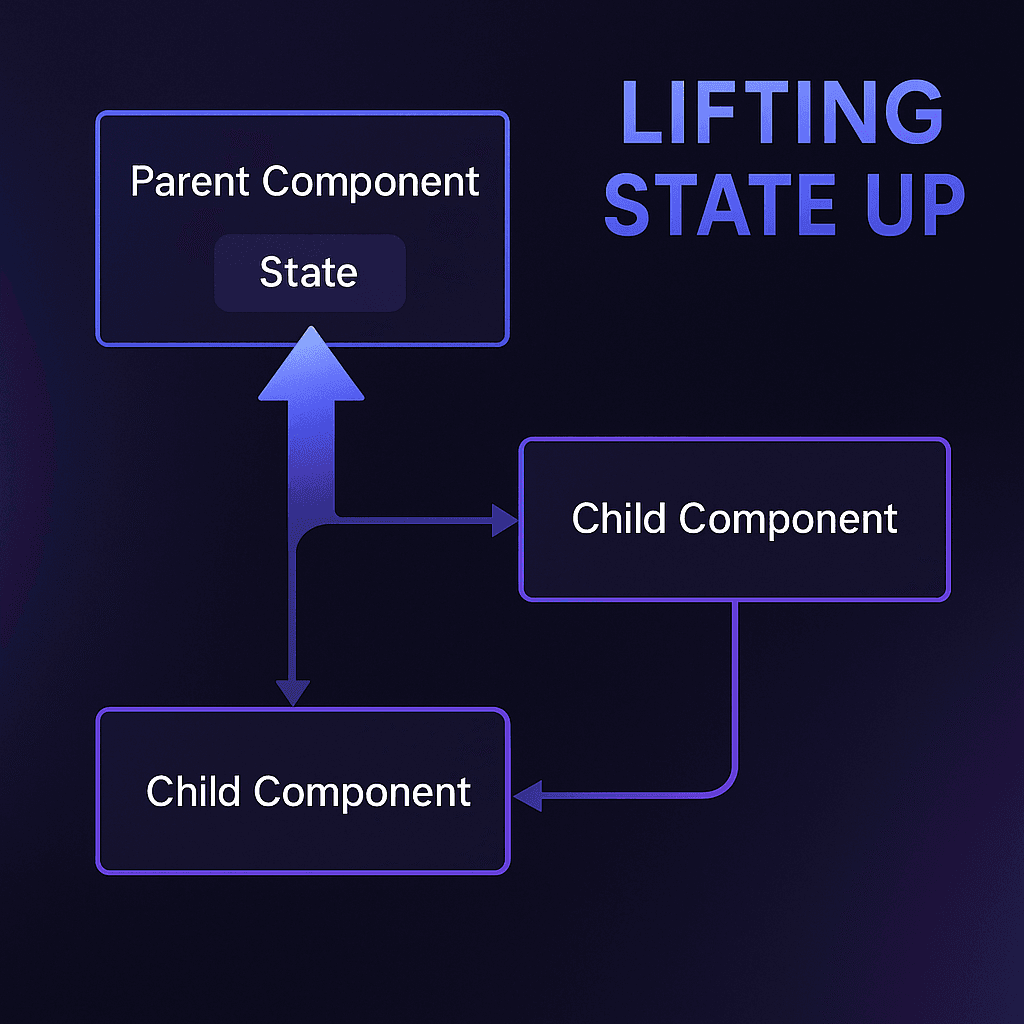
State management is one of the most essential yet challenging aspects of React development. For beginners and experienced developers alike, understanding how to effectively manage shared state is key to building scalable and maintainable UIs. This is where the concept of lifting state up becomes a game-changer.
In this guide, we'll take an in-depth look at lifting state in React, explore its benefits, and discuss how to recognize and implement it in real-world scenarios.
Introduction
#Imagine you're building a collaborative workspace app. You have two sibling components: a task input field and a task list display. When a user adds a task in one component, the other needs to update in real-time. How do you achieve this seamless communication?
The answer lies in lifting state up, a fundamental pattern that ensures components can share and synchronize data effectively. In this article, you'll learn what lifting state up means, when to use it, and how to apply it to solve real-world problems.
Understanding State and Props
#Before we dive into lifting state, let's revisit the basics:
State
#State in React refers to dynamic data that determines a component's behavior or appearance at any given time. It's managed internally within the component and updated using the useState hook or class-based setState.
function Counter() {
  const [count, setCount] = React.useState(0);
  return <button onClick={() => setCount(count + 1)}>Count: {count}</button>;
}
Props
#Props, short for properties, are used to pass data from a parent component to its children. They are immutable, ensuring that data flows unidirectionally.
function Display({ message }) {
  return <p>{message}</p>;
}

function App() {
  return <Display message="Hello, World!" />;
}
Understanding the interplay between state and props sets the stage for lifting state.
What is Lifting State Up?
#Definition
#Lifting state up involves moving the shared state to the closest common ancestor of the components that need access to it. This centralizes the state, making it easier to manage and share data between sibling components.
Benefits
#- Centralized State Management: Ensures a single source of truth
- Facilitates Sibling Communication: Simplifies data sharing between components
- Aligns with React Principles: Reinforces unidirectional data flow
Recognizing When to Lift State
#Indicators You Should Lift State
#- Sibling components need to share or synchronize data
- A child component needs to notify its parent or siblings of state changes
- You need a single source of truth to manage shared data
Examples
#- Form Inputs: A multi-input form where multiple fields affect a summary view
- Dynamic Lists: A list of items where changes in one item affect others
- Real-Time Search Interfaces: Search terms typed in one component update results in another
Practical Example: SearchForm and SearchResults
#Let's solve a common problem: syncing a search term between two components.
Initial Problem
#We have:
- A
SearchFormcomponent where users type a search term - A
SearchResultscomponent that displays results based on the search term
Step-by-Step Solution
#1. Create a Parent Component
#Move the search term state to a common parent component.
function App() {
  const [searchTerm, setSearchTerm] = React.useState("");

  return (
    <>
      <SearchForm searchTerm={searchTerm} onSearchChange={setSearchTerm} />
      <SearchResults searchTerm={searchTerm} />
    </>
  );
}
2. Pass State Down via Props
#The SearchForm receives searchTerm and onSearchChange via props.
function SearchForm({ searchTerm, onSearchChange }) {
  return (
    <input
      type="text"
      value={searchTerm}
      onChange={(e) => onSearchChange(e.target.value)}
      placeholder="Search..."
    />
  );
}
3. Use State in the Child
#The SearchResults component displays results based on searchTerm.
function SearchResults({ searchTerm }) {
  const results = fetchResults(searchTerm); // Assume this fetches filtered results
  return (
    <ul>
      {results.map((result, index) => (
        <li key={index}>{result}</li>
      ))}
    </ul>
  );
}
Outcome
#With state lifted to the App component, both SearchForm and SearchResults stay in sync seamlessly.
Real-World Applications
#E-commerce: Managing Shopping Carts
#Imagine an e-commerce platform with:
- A product list where users add items to their cart
- A cart summary displaying the selected items and total price
How Lifting State Works
#- Centralized State in Parent: The parent component (
CartManager) holds the state of the cart items - Shared State via Props:
- The product list sends updates to the parent (e.g., when an item is added)
- The cart summary retrieves the state from the parent to display a summary
Code Example
#function CartManager() {
const [cartItems, setCartItems] = React.useState([]);
const addToCart = (item) => {
setCartItems([...cartItems, item]);
};
const removeFromCart = (itemId) => {
setCartItems(cartItems.filter(item => item.id !== itemId));
};
const updateQuantity = (itemId, quantity) => {
setCartItems(cartItems.map(item =>
item.id === itemId ? { ...item, quantity } : item
));
};
return (
<>
<ProductList onAddToCart={addToCart} />
<CartSummary
items={cartItems}
onRemoveItem={removeFromCart}
onUpdateQuantity={updateQuantity}
/>
</>
);
}
Why It Works: By centralizing the state in CartManager, both child components can read from and update the cart seamlessly, avoiding duplication and inconsistency.
Media Players: Syncing Controls and Playback Timeline
#A media player has:
- Playback controls (play, pause, seek)
- A timeline that shows playback progress
How Lifting State Works
#- Parent State for Playback Data: The parent (
MediaController) maintains the current playback time and status (playing,paused) - Props for Synchronization:
- The controls send updates (e.g., seek position) to the parent
- The timeline reads the playback data from the parent
function MediaController() {
  const [isPlaying, setIsPlaying] = React.useState(false);
  const [currentTime, setCurrentTime] = React.useState(0);
  const [duration, setDuration] = React.useState(0);

  const togglePlayPause = () => {
    setIsPlaying(!isPlaying);
  };

  const seekTo = (time) => {
    setCurrentTime(time);
  };

  return (
    <>
      <PlaybackControls
        isPlaying={isPlaying}
        onTogglePlayPause={togglePlayPause}
        onSeek={seekTo}
      />
      <Timeline
        currentTime={currentTime}
        duration={duration}
        onSeek={seekTo}
      />
    </>
  );
}
Why It Works: By lifting state, the playback logic is centralized, ensuring accurate synchronization across the UI elements.
Search Features: Real-Time Suggestions and Filtering
#A search component displays:
- A search bar
- Real-time suggestions filtered by the search query
How Lifting State Works
#- Shared Query in Parent: The parent component holds the search query and fetches suggestions based on it
- Child Communication: The search bar updates the query; the suggestions component reads and displays filtered results
function SearchInterface() {
  const [query, setQuery] = React.useState("");
  const [suggestions, setSuggestions] = React.useState([]);

  React.useEffect(() => {
    if (query.length > 2) {
      fetchSuggestions(query).then(setSuggestions);
    } else {
      setSuggestions([]);
    }
  }, [query]);

  return (
    <>
      <SearchBar
        value={query}
        onChange={setQuery}
        placeholder="Search for products..."
      />
      <SuggestionsList
        suggestions={suggestions}
        onSelect={setQuery}
      />
    </>
  );
}
Why It Works: Lifting state reduces duplication and ensures the query and results are always consistent, regardless of user input speed or component re-renders.
Benefits of Lifting State Up
#1. Improves Scalability
#How: Centralized state acts as a single source of truth, simplifying:
- Feature Additions: Adding new components that rely on the same state becomes straightforward
- Consistency: Any state change automatically propagates to all dependent components
2. Enables Better Debugging
#How: With state centralized:
- Tracing Bugs: If something goes wrong, developers can inspect the single source of state rather than chasing down bugs across multiple components
- React DevTools: Centralized state makes it easier to see how props flow and identify discrepancies in the data
3. Adheres to React Principles
#How:
- React's unidirectional data flow is preserved, as state flows from parent to child components via props
- By avoiding local state duplication, the component hierarchy remains clean and predictable
Common Pitfalls and How to Avoid Them
#1. Overlifting State
#Why It Happens: Developers may mistakenly lift state even when sharing isn't necessary, leading to overly complex parent components.
How to Avoid:
- Analyze Scope: Keep state local unless sharing is required
- Example: A toggle button with no shared dependencies doesn't need its state lifted. It's simpler to keep the state in the button component itself
// ❌ WRONG: Unnecessary lifting
function App() {
  const [isToggled, setIsToggled] = React.useState(false);
  return <ToggleButton isToggled={isToggled} onToggle={setIsToggled} />;
}

// ✅ CORRECT: Keep local state
function ToggleButton() {
  const [isToggled, setIsToggled] = React.useState(false);
  return <button onClick={() => setIsToggled(!isToggled)}>
    {isToggled ? 'ON' : 'OFF'}
  </button>;
}
2. Prop Drilling
#Why It Happens: When state is lifted to a high-level parent, deeply nested components may require props to access it, resulting in unwieldy prop chains.
How to Avoid: Use React's Context API for deeply nested components
const CartContext = React.createContext();

function App() {
  const [cartItems, setCartItems] = React.useState([]);
  return (
    <CartContext.Provider value={{ cartItems, setCartItems }}>
      <Header />
      <MainContent />
      <Footer />
    </CartContext.Provider>
  );
}

function DeeplyNestedComponent() {
  const { cartItems } = React.useContext(CartContext);
  return <p>Total items: {cartItems.length}</p>;
}
3. State Duplication
#Why It Happens: Developers might accidentally maintain the same state in multiple places.
How to Avoid:
- Always identify the single source of truth
- Use derived state when possible instead of duplicating state
// ❌ WRONG: Duplicated state
function App() {
  const [items, setItems] = React.useState([]);
  const [totalItems, setTotalItems] = React.useState(0);

  const addItem = (item) => {
    setItems([...items, item]);
    setTotalItems(totalItems + 1); // This can get out of sync
  };
}

// ✅ CORRECT: Derived state
function App() {
  const [items, setItems] = React.useState([]);
  const totalItems = items.length; // Derived from items

  const addItem = (item) => {
    setItems([...items, item]);
  };
}
Advanced Patterns
#Custom Hooks for State Logic
#Extract complex state logic into custom hooks:
function useCart() {
  const [items, setItems] = React.useState([]);

  const addItem = React.useCallback((item) => {
    setItems(prev => [...prev, item]);
  }, []);

  const removeItem = React.useCallback((itemId) => {
    setItems(prev => prev.filter(item => item.id !== itemId));
  }, []);

  const total = React.useMemo(() =>
    items.reduce((sum, item) => sum + item.price, 0),
    [items]
  );

  return { items, addItem, removeItem, total };
}

function CartManager() {
  const { items, addItem, removeItem, total } = useCart();

  return (
    <>
      <ProductList onAddToCart={addItem} />
      <CartSummary
        items={items}
        onRemoveItem={removeItem}
        total={total}
      />
    </>
  );
}
State Reducers for Complex Logic
#For complex state updates, use useReducer:
function cartReducer(state, action) {
  switch (action.type) {
    case 'ADD_ITEM':
      return {
        ...state,
        items: [...state.items, action.payload]
      };
    case 'REMOVE_ITEM':
      return {
        ...state,
        items: state.items.filter(item => item.id !== action.payload)
      };
    case 'CLEAR_CART':
      return { ...state, items: [] };
    default:
      return state;
  }
}

function CartManager() {
  const [state, dispatch] = React.useReducer(cartReducer, { items: [] });

  return (
    <>
      <ProductList onAddToCart={(item) =>
        dispatch({ type: 'ADD_ITEM', payload: item })
      } />
      <CartSummary
        items={state.items}
        onClearCart={() => dispatch({ type: 'CLEAR_CART' })}
      />
    </>
  );
}
Debugging and Tools
#1. Using React DevTools
#How:
- Inspect component hierarchies to see how state and props flow
- Identify mismatched or unexpected state values
- Use the Profiler to identify performance issues
2. Console Logging
#How: Strategically place logs in parent and child components to trace state updates:
function Parent() {
  const [state, setState] = React.useState(initialState);

  React.useEffect(() => {
    console.log("Parent State Updated:", state);
  }, [state]);

  return <Child state={state} onStateChange={setState} />;
}
3. Debugging in Browser Developer Tools
#How: Use breakpoints to:
- Pause code execution during state updates
- Inspect the exact values being passed to components
- Step through state update functions
Performance Considerations
#Memoization for Expensive Calculations
#function ExpensiveComponent({ items, filter }) {
const filteredItems = React.useMemo(() => {
return items.filter(item => item.category === filter);
}, [items, filter]);
return (
<ul>
{filteredItems.map(item => (
<li key={item.id}>{item.name}</li>
))}
</ul>
);
}
Callback Memoization
#function Parent() {
const [items, setItems] = React.useState([]);
const handleAddItem = React.useCallback((item) => {
setItems(prev => [...prev, item]);
}, []);
return <Child onAddItem={handleAddItem} />;
}
Testing Lifted State
#Unit Testing Components
#import { render, screen, fireEvent } from '@testing-library/react';
import { App } from './App';
test('search form updates search results', () => {
render(<App />);
const searchInput = screen.getByPlaceholderText('Search...');
fireEvent.change(searchInput, { target: { value: 'react' } });
expect(screen.getByText('Search results for: react')).toBeInTheDocument();
});
Integration Testing
#test('cart state is shared between components', () => {
render(<App />);
const addButton = screen.getByText('Add to Cart');
fireEvent.click(addButton);
expect(screen.getByText('Cart (1)')).toBeInTheDocument();
expect(screen.getByText('Total: $29.99')).toBeInTheDocument();
});
Conclusion
#Lifting state up is a powerful tool in React's state management arsenal. It simplifies component communication, enhances maintainability, and aligns with React's core principles. By understanding when and how to lift state, you can build applications that are not only functional but also robust and scalable.
Key Takeaways
#- Lift state when components need to share data
- Keep state as close to where it's used as possible
- Use Context API to avoid prop drilling
- Extract complex state logic into custom hooks
- Test your state management thoroughly
Next Steps
#- Practice lifting state in your own projects
- Explore advanced patterns like Context API and Redux
- Learn about state management libraries for complex applications
- Study performance optimization techniques for large state trees
Start applying these concepts in your projects, and explore advanced state management techniques like Context API and Redux for more complex needs.